class: center, middle, inverse, title-slide # Putting the <a href=""><code>R</code></a> in <a href=""><code>R</code></a>eed and <br> in Lewis and Cla<a href=""><code>R</code></a>k ### Chester Ismay <br><br> GitHub: <a href="https://github.com/ismayc"><code>ismayc</code></a> <br> Twitter: <a href="https://twitter.com/old_man_chester"><code>@old_man_chester</code></a> ### 2017-05-25 & 2017-05-26 <br><br> Bootcamp website at <a href="http://bit.ly/rbootcamp17" class="uri">http://bit.ly/rbootcamp17</a> <br> Slides available at <a href="http://bit.ly/rbootcamp17-slides" class="uri">http://bit.ly/rbootcamp17-slides</a> --- name: toc # Table of Contents - [Data Viz](#viz) - [Data Wrangling](#wrangle) - [Data Importing](#import) - [Data Tidying](#tidy) - [Data Modeling](#model) - [Data Communicating](#rmarkdown) --- class: inverse, center, middle <!-- Write slide link on whiteboard --> # Pre-bootcamp HW ## Talk about your analysis on the <br> `weather` data <br> in groups of 2-3 --- # Let's get it all out there ## When you think of R what comes to mind? --- name: whyr ## Why are you here wanting to learn R? - ~~Because you enjoy partaking in [Schadenfreude](https://en.wikipedia.org/wiki/Schadenfreude)~~ <center> <img src="figure/google_scholar.png" style="width: 700px;"/> </center> --- ## Why should you learn R? - R is free, R improves, R has existed for 40+ years - Students can show what they have learned to a potential employer easily - The support system for R is actually much better than some people say --- ## But as a professor, why should you learn R? - R and R Markdown will save you TONS of time. Long term thinking is key. - You can easily tweak your code if you need to do another analysis - Remembering what drop-down menu some thing is in two years from now in a different program will be hard - Remembering to copy-and-paste your updated plots/analysis into your word processor is a pain and error prone --- ## But as a professor, why should you learn R? <center> <img src="figure/tweet.jpg" style="width: 700px;"/> </center> --- class: inverse, center, middle # DEMO in RStudio <br> with R Markdown --- class: center, middle ## Analogy R | RStudio | DataCamp :-------------------------:|:-------------------------:|:-------------------------: <img src="figure/engine.jpg" alt="Drawing" style="width: 350px;"/> | <img src="figure/dashboard.jpg" alt="Drawing" style="width: 350px;"/> | <img src="figure/instructor.jpg" alt="Drawing" style="width: 350px;"/> --- ## What this bootcamp is  - Designed for all levels of knowledge and background --- ## What this bootcamp is not - A thorough development of machine learning <br> techniques applied to big data -- - A discussion on the role of _p_-values in science -- - A tutorial on how to work with base R subsetting and base R graphics --- ## What I hope you'll learn - That R is not as scary as it used to be. -- - Learning how to Google is an incredibly valuable skill. -- - That having students turn in assignments using R scripts and R Markdown provides an efficient way to check their work and their analyses easily. --- ## What I hope you'll learn - That the R packages you will use in this workshop are the same ones that are used by scientists and graduate programs all over the world -- - That teaching students how to use open-source tools is what is best for them long term -- - That students with no programming background can do great things in only a few weeks - [Sociology/Criminal Justice majors at Pacific U.](https://ismayc.github.io/soc301_s2017/group-projects/index.html) - [A wide range of students at Middlebury College](https://rudeboybert.github.io/MATH116/PS/final_project/final_project_outline.html) --- ## Pieces of advice <center> <a href="http://giphy.com/gifs/pool-diving-synchronized-swimming-pDWtwK7D2IlFu"><img src="figure/giphy2.gif" style="width: 300px;"/></a> </center> - Scaffold & support as a foreign languages do -- - To be able to use R (and really any other language), students need more than a few assignments and more than a weekly lab -- - Make use of RStudio Projects (students have a really hard time navigating directory structures) --- ## Pieces of advice ### My opinion - Have students work on writing their code in R script files and documenting their errors - This is the same workflow that DataCamp uses -- - Show students [R Markdown after a few weeks](https://ismayc.github.io/soc301_s2017/schedule/) of working with the script file - I've found it is hard for students to learn R and R Markdown from the start - Better to have them use R Markdown in groups initially --- class: inverse, center, middle # R Data Types --- ## The bare minimum needed for understanding today Vector/variable - Type of vector (`int`, `num`, `chr`, `lgl`, `date`) -- Data frame - Vectors of (potentially) different types - Each vector has the same number of rows --- ## The bare minimum needed for understanding today ```r library(tibble) library(lubridate) ex1 <- data_frame( vec1 = c(1980, 1990, 2000, 2010), vec2 = c(1L, 2L, 3L, 4L), vec3 = c("low", "low", "high", "high"), vec4 = c(TRUE, FALSE, FALSE, FALSE), vec5 = ymd(c("2017-05-23", "1776/07/04", "1983-05/31", "1908/04-01")) ) ex1 ``` -- ``` # A tibble: 4 x 5 vec1 vec2 vec3 vec4 vec5 <dbl> <int> <chr> <lgl> <date> 1 1980 1 low TRUE 2017-05-23 2 1990 2 low FALSE 1776-07-04 3 2000 3 high FALSE 1983-05-31 4 2010 4 high FALSE 1908-04-01 ``` --- class: center, middle # Welcome to the [tidyverse](https://blog.rstudio.org/2016/09/15/tidyverse-1-0-0/)! The `tidyverse` is a collection of R packages that share common philosophies and are designed to work together. <br><br> <a href="http://tidyverse.tidyverse.org/logo.png"><img src="figure/tidyverse.png" style="width: 200px;"/><a> --- ## Beginning steps Frequently the first thing to do when given a dataset is to - identify the observational unit, - specify the variables, - give the types of variables you are presented with, and - check that the data is <u>tidy</u>. (TO COME) This will help with - choosing the appropriate plot, - summarizing the data, and - understanding which inferences/models can be applied. --- class: inverse, center, middle name: viz # Data Visualization <a href="http://gitsense.github.io/images/wealth.gif"><img src="figure/wealth.gif" style="width: 770px;"/></a> Inspired by [Hans Rosling](https://www.youtube.com/watch?v=jbkSRLYSojo) --- <img src="slide_deck_files/figure-html/unnamed-chunk-4-1.png" style="display: block; margin: auto;" /> - What are the variables here? - What is the observational unit? - How are the variables mapped to aesthetics? --- ## Grammar of Graphics .left-column[ Wilkinson (2005) laid out the proposed "Grammar of Graphics" ] .right-column[ <a href="http://www.powells.com/book/the-grammar-of-graphics-9780387245447"><img src="figure/graphics.jpg" style="width: 300px;"></a> ] --- ## Grammar of Graphics in R .left-column[ Wickham implemented the grammar in R in the `ggplot2` package ] .right-column[ <a href="http://www.powells.com/book/ggplot2-elegant-graphics-for-data-analysis-9783319242750/68-428"><img src="figure/ggplot2.jpg" style="width: 300px;"></a> ] --- ## Grammar of Graphics elsewhere - [Make plots online with plotly](https://plot.ly/) - [Leland Wilkinson](https://research.tableau.com/user/leland-wilkinson) works at [Tableau](https://www.tableau.com/) - The Grammar of Graphics provides a theoretical framework for building and deciphering statistical graphics --- class: center, middle # What is a statistical graphic? -- ## A `mapping` of <br> `data` variables -- ## to <br> `aes()`thetic attributes -- ## of <br> `geom_`etric objects. --- class: inverse, center, middle # Back to basics --- ### Consider the following data in tidy format: ```r simple_ex <- data_frame( A = c(1980, 1990, 2000, 2010), B = c(1, 2, 3, 4), C = c(3, 2, 1, 2), D = c("low", "low", "high", "high") ) simple_ex ``` ``` # A tibble: 4 x 4 A B C D <dbl> <dbl> <dbl> <chr> 1 1980 1 3 low 2 1990 2 2 low 3 2000 3 1 high 4 2010 4 2 high ``` <!-- Copy to chalkboard/whiteboard --> --- ### Consider the following data in tidy format: <table> <thead> <tr> <th style="text-align:right;"> A </th> <th style="text-align:right;"> B </th> <th style="text-align:right;"> C </th> <th style="text-align:left;"> D </th> </tr> </thead> <tbody> <tr> <td style="text-align:right;"> 1980 </td> <td style="text-align:right;"> 1 </td> <td style="text-align:right;"> 3 </td> <td style="text-align:left;"> low </td> </tr> <tr> <td style="text-align:right;"> 1990 </td> <td style="text-align:right;"> 2 </td> <td style="text-align:right;"> 2 </td> <td style="text-align:left;"> low </td> </tr> <tr> <td style="text-align:right;"> 2000 </td> <td style="text-align:right;"> 3 </td> <td style="text-align:right;"> 1 </td> <td style="text-align:left;"> high </td> </tr> <tr> <td style="text-align:right;"> 2010 </td> <td style="text-align:right;"> 4 </td> <td style="text-align:right;"> 2 </td> <td style="text-align:left;"> high </td> </tr> </tbody> </table> - Sketch the graphics below on paper, where the `x`-axis is variable `A` and the `y`-axis is variable `B` 1. <small>A scatter plot</small> 1. <small>A scatter plot where the `color` of the points corresponds to `D`</small> 1. <small>A scatter plot where the `size` of the points corresponds to `C`</small> 1. <small>A line graph</small> 1. <small>A line graph where the `color` of the line corresponds to `D` with points added that are all forestgreen of size 4.</small> --- ## Reproducing the plots in <small>`ggplot2`</small> ### 1. A scatterplot ```r library(ggplot2) ggplot(data = simple_ex, mapping = aes(x = A, y = B)) + geom_point() ``` -- <!-- --> --- ## Reproducing the plots in <small>`ggplot2`</small> ### 2. A scatter plot where the `color` of the points corresponds to `group` ```r library(ggplot2) ggplot(data = simple_ex, mapping = aes(x = A, y = B)) + geom_point(mapping = aes(color = D)) ``` -- <!-- --> --- ## Reproducing the plots in <small>`ggplot2`</small> ### 3. A scatter plot where the `size` of the points corresponds to `C` ```r library(ggplot2) ggplot(data = simple_ex, mapping = aes(x = A, y = B, size = C)) + geom_point() ``` -- <!-- --> --- ## Reproducing the plots in <small>`ggplot2`</small> ### 4. A line graph ```r library(ggplot2) ggplot(data = simple_ex, mapping = aes(x = A, y = B)) + geom_line() ``` -- <!-- --> --- ## Reproducing the plots in <small>`ggplot2`</small> ### 5. A line graph where the `color` of the line corresponds to `D` with points added that are all blue of size 4. ```r library(ggplot2) ggplot(data = simple_ex, mapping = aes(x = A, y = B)) + geom_line(mapping = aes(color = D)) + geom_point(color = "forestgreen", size = 4) ``` -- <!-- --> --- # The Five-Named Graphs ## The 5NG of data viz - Scatterplot: `geom_point()` - Line graph: `geom_line()` -- - Histogram: `geom_histogram()` - Boxplot: `geom_boxplot()` - Bar graph: `geom_bar()` --- class: center, middle ## More `ggplot2` examples --- ## Histogram ```r library(nycflights13) ggplot(data = weather, mapping = aes(x = humid)) + geom_histogram(bins = 20, color = "black", fill = "darkorange") ``` <!-- --> --- ## Boxplot (broken) ```r library(nycflights13) ggplot(data = weather, mapping = aes(x = month, y = humid)) + geom_boxplot() ``` <!-- --> --- ## Boxplot (almost fixed) ```r library(nycflights13) ggplot(data = weather, mapping = aes(x = month, group = month, y = humid)) + geom_boxplot() ``` <!-- --> --- # Boxplot (fixed) ```r library(nycflights13) ggplot(data = weather, mapping = aes(x = month, group = month, y = humid)) + geom_boxplot() + scale_x_continuous(breaks = 1:12) ``` 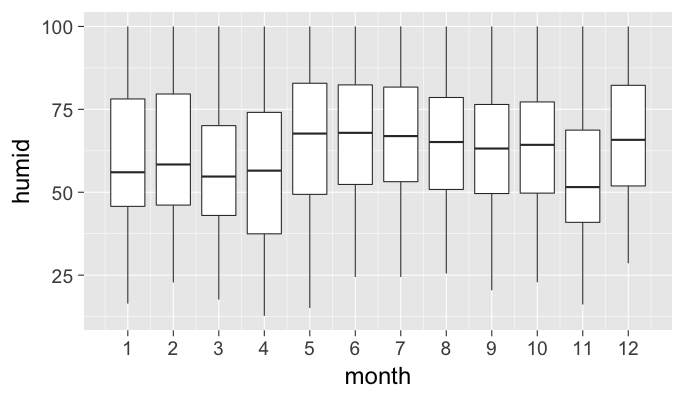<!-- --> --- ## Bar graph ```r library(fivethirtyeight) ggplot(data = bechdel, mapping = aes(x = clean_test)) + geom_bar() ``` 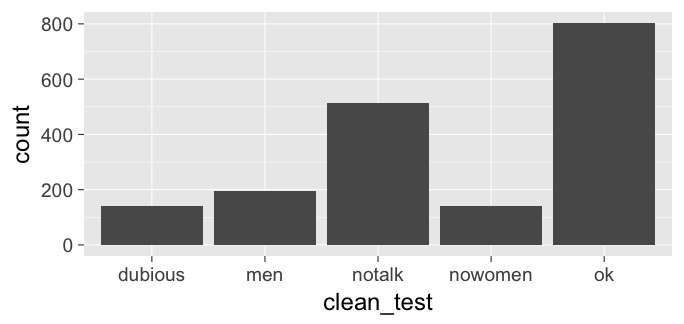<!-- --> --- ## How about over time? - Hop into `dplyr` ```r library(dplyr) year_bins <- c("'70-'74", "'75-'79", "'80-'84", "'85-'89", "'90-'94", "'95-'99", "'00-'04", "'05-'09", "'10-'13") bechdel <- bechdel %>% mutate(five_year = cut(year, breaks = seq(1969, 2014, 5), labels = year_bins)) %>% mutate(clean_test = factor(clean_test, levels = c("nowomen", "notalk", "men", "dubious", "ok"))) ``` --- ## How about over time? (Stacked) ```r library(fivethirtyeight) library(ggplot2) ggplot(data = bechdel, mapping = aes(x = five_year, fill = clean_test)) + geom_bar() ``` 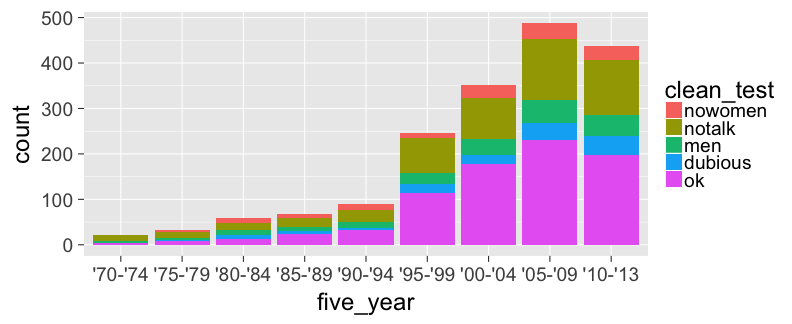<!-- --> --- ## How about over time? (Side-by-side) ```r library(fivethirtyeight) library(ggplot2) ggplot(data = bechdel, mapping = aes(x = five_year, fill = clean_test)) + geom_bar(position = "dodge") ``` 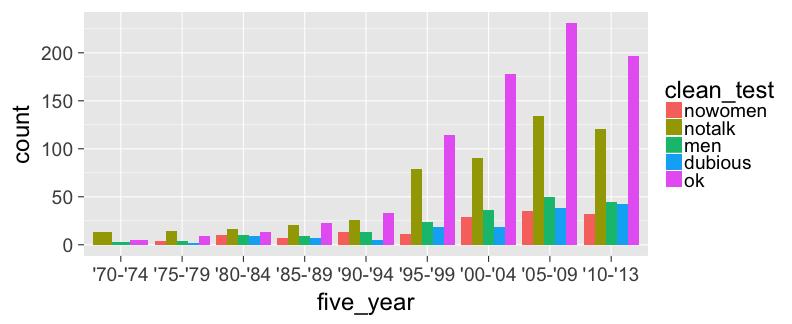<!-- --> --- ## How about over time? (Stacked proportional) ```r library(fivethirtyeight) library(ggplot2) ggplot(data = bechdel, mapping = aes(x = five_year, fill = clean_test)) + geom_bar(position = "fill", color = "black") ``` <!-- --> --- class: center, middle ## The `tidyverse`/`ggplot2` is for beginners and <br> for data science professionals! <a href="https://fivethirtyeight.com/features/the-dollar-and-cents-case-against-hollywoods-exclusion-of-women/"><img src="figure/bechdel.png" style="width: 500px;"/><a> --- ## Practice Produce appropriate 5NG with R package & data set in [ ], e.g., [`nycflights13` `\(\rightarrow\)` `weather`] <!-- Try to look through the help documentation/Google to improve your plots --> 1. Does `age` predict `recline_rude`? <br> [`fivethirtyeight` `\(\rightarrow\)` `na.omit(flying)`] 2. Distribution of `age` by `sex` <br> [`okcupiddata` `\(\rightarrow\)` `profiles`] 3. Does `budget` predict `rating`? <br> [`ggplot2movies` `\(\rightarrow\)` `movies`] 4. Distribution of log base 10 scale of `budget_2013` <br> [`fivethirtyeight` `\(\rightarrow\)` `bechdel`] --- ### HINTS <!-- --> --- class: inverse, center, middle # DEMO of `ggplot2` in RStudio --- class: center, middle ### Determining the appropriate plot <a href="https://coggle.it/diagram/V_G2gzukTDoQ-aZt"><img src="figure/viz_mindmap.png" style="width: 400px;"/><a> --- class: inverse, center, middle name: wrangle # Day 2 ## Data Wrangling --- ### `gapminder` data frame in the `gapminder` package ```r library(gapminder) gapminder ``` ``` # A tibble: 1,704 x 6 country continent year lifeExp pop gdpPercap <fctr> <fctr> <int> <dbl> <int> <dbl> 1 Afghanistan Asia 1952 28.801 8425333 779.4453 2 Afghanistan Asia 1957 30.332 9240934 820.8530 3 Afghanistan Asia 1962 31.997 10267083 853.1007 4 Afghanistan Asia 1967 34.020 11537966 836.1971 5 Afghanistan Asia 1972 36.088 13079460 739.9811 6 Afghanistan Asia 1977 38.438 14880372 786.1134 7 Afghanistan Asia 1982 39.854 12881816 978.0114 8 Afghanistan Asia 1987 40.822 13867957 852.3959 9 Afghanistan Asia 1992 41.674 16317921 649.3414 10 Afghanistan Asia 1997 41.763 22227415 635.3414 # ... with 1,694 more rows ``` --- ## Base R versus the `tidyverse` Say we wanted mean life expectancy across all years for Asia -- ```r # Base R asia <- gapminder[gapminder$continent == "Asia", ] mean(asia$lifeExp) ``` ``` [1] 60.0649 ``` -- ```r library(dplyr) gapminder %>% filter(continent == "Asia") %>% summarize(mean_exp = mean(lifeExp)) ``` ``` # A tibble: 1 x 1 mean_exp <dbl> 1 60.0649 ``` --- ## The pipe `%>%` <!-- -->    <!-- --> -- - A way to chain together commands -- - It is *essentially* the `dplyr` equivalent to the <br> `+` in `ggplot2` --- ## The 5NG of data viz -- ### `geom_point()`<br> `geom_line()` <br> `geom_histogram()`<br> `geom_boxplot()`<br> `geom_bar()` --- # The Five Main Verbs (5MV) of data wrangling ### `filter()` <br> `summarize()` <br> `group_by()` <br> `mutate()` <br> `arrange()` --- ## `filter()` - Select a subset of the rows of a data frame. - The arguments are the "filters" that you'd like to apply. -- ```r library(gapminder); library(dplyr) gap_2007 <- gapminder %>% filter(year == 2007) head(gap_2007) ``` ``` # A tibble: 6 x 6 country continent year lifeExp pop gdpPercap <fctr> <fctr> <int> <dbl> <int> <dbl> 1 Afghanistan Asia 2007 43.828 31889923 974.5803 2 Albania Europe 2007 76.423 3600523 5937.0295 3 Algeria Africa 2007 72.301 33333216 6223.3675 4 Angola Africa 2007 42.731 12420476 4797.2313 5 Argentina Americas 2007 75.320 40301927 12779.3796 6 Australia Oceania 2007 81.235 20434176 34435.3674 ``` - Use `==` to compare a variable to a value --- ## Logical operators - Use `|` to check for any in multiple filters being true: -- ```r gapminder %>% filter(year == 2002 | continent == "Europe") ``` -- ``` # A tibble: 472 x 6 country continent year lifeExp pop gdpPercap <fctr> <fctr> <int> <dbl> <int> <dbl> 1 Afghanistan Asia 2002 42.129 25268405 726.7341 2 Albania Europe 1952 55.230 1282697 1601.0561 3 Albania Europe 1957 59.280 1476505 1942.2842 4 Albania Europe 1962 64.820 1728137 2312.8890 5 Albania Europe 1967 66.220 1984060 2760.1969 6 Albania Europe 1972 67.690 2263554 3313.4222 7 Albania Europe 1977 68.930 2509048 3533.0039 8 Albania Europe 1982 70.420 2780097 3630.8807 9 Albania Europe 1987 72.000 3075321 3738.9327 10 Albania Europe 1992 71.581 3326498 2497.4379 # ... with 462 more rows ``` --- ## Logical operators - Use `&` or `,` to check for all of multiple filters being true: -- ```r gapminder %>% filter(year == 2002, continent == "Europe") ``` ``` # A tibble: 30 x 6 country continent year lifeExp pop gdpPercap <fctr> <fctr> <int> <dbl> <int> <dbl> 1 Albania Europe 2002 75.651 3508512 4604.212 2 Austria Europe 2002 78.980 8148312 32417.608 3 Belgium Europe 2002 78.320 10311970 30485.884 4 Bosnia and Herzegovina Europe 2002 74.090 4165416 6018.975 5 Bulgaria Europe 2002 72.140 7661799 7696.778 6 Croatia Europe 2002 74.876 4481020 11628.389 7 Czech Republic Europe 2002 75.510 10256295 17596.210 8 Denmark Europe 2002 77.180 5374693 32166.500 9 Finland Europe 2002 78.370 5193039 28204.591 10 France Europe 2002 79.590 59925035 28926.032 # ... with 20 more rows ``` --- ## Logical operators - Use `%in%` to check for any being true <br> (shortcut to using `|` repeatedly with `==`) -- ```r gapminder %>% filter(country %in% c("Argentina", "Belgium", "Mexico"), year %in% c(1987, 1992)) ``` -- ``` # A tibble: 6 x 6 country continent year lifeExp pop gdpPercap <fctr> <fctr> <int> <dbl> <int> <dbl> 1 Argentina Americas 1987 70.774 31620918 9139.671 2 Argentina Americas 1992 71.868 33958947 9308.419 3 Belgium Europe 1987 75.350 9870200 22525.563 4 Belgium Europe 1992 76.460 10045622 25575.571 5 Mexico Americas 1987 69.498 80122492 8688.156 6 Mexico Americas 1992 71.455 88111030 9472.384 ``` --- ## `summarize()` - Any numerical summary that you want to apply to a column of a data frame is specified within `summarize()`. ```r max_exp_1997 <- gapminder %>% filter(year == 1997) %>% summarize(max_exp = max(lifeExp)) max_exp_1997 ``` -- ``` # A tibble: 1 x 1 max_exp <dbl> 1 80.69 ``` --- ### Combining `summarize()` with `group_by()` When you'd like to determine a numerical summary for all levels of a different categorical variable ```r max_exp_1997_by_cont <- gapminder %>% filter(year == 1997) %>% group_by(continent) %>% summarize(max_exp = max(lifeExp)) max_exp_1997_by_cont ``` -- ``` # A tibble: 5 x 2 continent max_exp <fctr> <dbl> 1 Africa 74.772 2 Americas 78.610 3 Asia 80.690 4 Europe 79.390 5 Oceania 78.830 ``` --- ### Without the `%>%` It's hard to appreciate the `%>%` without seeing what the code would look like without it: ```r max_exp_1997_by_cont <- summarize( group_by( filter( gapminder, year == 1997), continent), max_exp = max(lifeExp)) max_exp_1997_by_cont ``` ``` # A tibble: 5 x 2 continent max_exp <fctr> <dbl> 1 Africa 74.772 2 Americas 78.610 3 Asia 80.690 4 Europe 79.390 5 Oceania 78.830 ``` --- ## `ggplot2` revisited For aggregated data, use `geom_col` ```r ggplot(data = max_exp_1997_by_cont, mapping = aes(x = continent, y = max_exp)) + geom_col() ``` <!-- --> --- ## The 5MV - `filter()` - `summarize()` - `group_by()` -- - `mutate()` -- - `arrange()` --- ## `mutate()` - Allows you to 1. <font color="blue">create a new variable with a specific value</font> OR 2. create a new variable based on other variables OR 3. change the contents of an existing variable -- ```r gap_plus <- gapminder %>% mutate(just_one = 1) head(gap_plus) ``` ``` # A tibble: 6 x 7 country continent year lifeExp pop gdpPercap just_one <fctr> <fctr> <int> <dbl> <int> <dbl> <dbl> 1 Afghanistan Asia 1952 28.801 8425333 779.4453 1 2 Afghanistan Asia 1957 30.332 9240934 820.8530 1 3 Afghanistan Asia 1962 31.997 10267083 853.1007 1 4 Afghanistan Asia 1967 34.020 11537966 836.1971 1 5 Afghanistan Asia 1972 36.088 13079460 739.9811 1 6 Afghanistan Asia 1977 38.438 14880372 786.1134 1 ``` --- ## `mutate()` - Allows you to 1. create a new variable with a specific value OR 2. <font color="blue">create a new variable based on other variables</font> OR 3. change the contents of an existing variable -- ```r gap_w_gdp <- gapminder %>% mutate(gdp = pop * gdpPercap) head(gap_w_gdp) ``` ``` # A tibble: 6 x 7 country continent year lifeExp pop gdpPercap gdp <fctr> <fctr> <int> <dbl> <int> <dbl> <dbl> 1 Afghanistan Asia 1952 28.801 8425333 779.4453 6567086330 2 Afghanistan Asia 1957 30.332 9240934 820.8530 7585448670 3 Afghanistan Asia 1962 31.997 10267083 853.1007 8758855797 4 Afghanistan Asia 1967 34.020 11537966 836.1971 9648014150 5 Afghanistan Asia 1972 36.088 13079460 739.9811 9678553274 6 Afghanistan Asia 1977 38.438 14880372 786.1134 11697659231 ``` --- ## `mutate()` - Allows you to 1. create a new variable with a specific value OR 2. create a new variable based on other variables OR 3. <font color="blue">change the contents of an existing variable</font> -- ```r gap_weird <- gapminder %>% mutate(pop = pop + 1000) head(gap_weird) ``` ``` # A tibble: 6 x 6 country continent year lifeExp pop gdpPercap <fctr> <fctr> <int> <dbl> <dbl> <dbl> 1 Afghanistan Asia 1952 28.801 8426333 779.4453 2 Afghanistan Asia 1957 30.332 9241934 820.8530 3 Afghanistan Asia 1962 31.997 10268083 853.1007 4 Afghanistan Asia 1967 34.020 11538966 836.1971 5 Afghanistan Asia 1972 36.088 13080460 739.9811 6 Afghanistan Asia 1977 38.438 14881372 786.1134 ``` --- ## `arrange()` - Reorders the rows in a data frame based on the values of one or more variables -- ```r gapminder %>% arrange(year, country) ``` ``` # A tibble: 1,704 x 6 country continent year lifeExp pop gdpPercap <fctr> <fctr> <int> <dbl> <int> <dbl> 1 Afghanistan Asia 1952 28.801 8425333 779.4453 2 Albania Europe 1952 55.230 1282697 1601.0561 3 Algeria Africa 1952 43.077 9279525 2449.0082 4 Angola Africa 1952 30.015 4232095 3520.6103 5 Argentina Americas 1952 62.485 17876956 5911.3151 6 Australia Oceania 1952 69.120 8691212 10039.5956 7 Austria Europe 1952 66.800 6927772 6137.0765 8 Bahrain Asia 1952 50.939 120447 9867.0848 9 Bangladesh Asia 1952 37.484 46886859 684.2442 10 Belgium Europe 1952 68.000 8730405 8343.1051 # ... with 1,694 more rows ``` --- ## `arrange()` - Can also put into descending order -- ```r gapminder %>% filter(year > 2000) %>% arrange(desc(lifeExp)) ``` ``` # A tibble: 284 x 6 country continent year lifeExp pop gdpPercap <fctr> <fctr> <int> <dbl> <int> <dbl> 1 Japan Asia 2007 82.603 127467972 31656.07 2 Hong Kong, China Asia 2007 82.208 6980412 39724.98 3 Japan Asia 2002 82.000 127065841 28604.59 4 Iceland Europe 2007 81.757 301931 36180.79 5 Switzerland Europe 2007 81.701 7554661 37506.42 6 Hong Kong, China Asia 2002 81.495 6762476 30209.02 7 Australia Oceania 2007 81.235 20434176 34435.37 8 Spain Europe 2007 80.941 40448191 28821.06 9 Sweden Europe 2007 80.884 9031088 33859.75 10 Israel Asia 2007 80.745 6426679 25523.28 # ... with 274 more rows ``` --- ## Don't mix up `arrange` and `group_by` - `group_by` is used (mostly) with `summarize` to calculate summaries over groups - `arrange` is used for sorting --- ## Don't mix up `arrange` and `group_by` This doesn't really do anything useful ```r gapminder %>% group_by(year) ``` ``` Source: local data frame [1,704 x 6] Groups: year [12] # A tibble: 1,704 x 6 country continent year lifeExp pop gdpPercap <fctr> <fctr> <int> <dbl> <int> <dbl> 1 Afghanistan Asia 1952 28.801 8425333 779.4453 2 Afghanistan Asia 1957 30.332 9240934 820.8530 3 Afghanistan Asia 1962 31.997 10267083 853.1007 4 Afghanistan Asia 1967 34.020 11537966 836.1971 5 Afghanistan Asia 1972 36.088 13079460 739.9811 6 Afghanistan Asia 1977 38.438 14880372 786.1134 7 Afghanistan Asia 1982 39.854 12881816 978.0114 8 Afghanistan Asia 1987 40.822 13867957 852.3959 9 Afghanistan Asia 1992 41.674 16317921 649.3414 10 Afghanistan Asia 1997 41.763 22227415 635.3414 # ... with 1,694 more rows ``` --- ## Don't mix up `arrange` and `group_by` But this does ```r gapminder %>% arrange(year) ``` ``` # A tibble: 1,704 x 6 country continent year lifeExp pop gdpPercap <fctr> <fctr> <int> <dbl> <int> <dbl> 1 Afghanistan Asia 1952 28.801 8425333 779.4453 2 Albania Europe 1952 55.230 1282697 1601.0561 3 Algeria Africa 1952 43.077 9279525 2449.0082 4 Angola Africa 1952 30.015 4232095 3520.6103 5 Argentina Americas 1952 62.485 17876956 5911.3151 6 Australia Oceania 1952 69.120 8691212 10039.5956 7 Austria Europe 1952 66.800 6927772 6137.0765 8 Bahrain Asia 1952 50.939 120447 9867.0848 9 Bangladesh Asia 1952 37.484 46886859 684.2442 10 Belgium Europe 1952 68.000 8730405 8343.1051 # ... with 1,694 more rows ``` --- ## Changing of observation unit True or False > Each of `filter`, `mutate`, and `arrange` change the observational unit. -- True or False > `group_by() %>% summarize()` changes the observational unit. <!-- Draw diagram for average monthly temp aggregated like on rstudio::conf slides --> --- ## What is meant by "joining data frames" and <br> why is it useful? -- <img src="https://ismayc.github.io/moderndiver-book/images/join-inner.png" style="display: block; margin: auto;" /> --- ### Does cost of living in a state relate to whether police officers live in the cities they patrol? What about state political ideology? ```r library(fivethirtyeight); library(readr); library(dplyr) police2 <- police_locals %>% select(city, all) ideology <- read_csv("https://ismayc.github.io/Effective-Data-Storytelling-using-the-tidyverse/datasets/ideology.csv") police_join <- inner_join(x = police2, y = ideology, by = "city") police_join ``` -- ``` # A tibble: 75 x 4 city all state state_ideology <chr> <dbl> <chr> <chr> 1 New York 0.6179567 New York Liberal 2 Chicago 0.8750000 Illinois Liberal 3 Los Angeles 0.2282178 California Liberal 4 Washington 0.1156317 District of Columbia Liberal 5 Houston 0.2922078 Texas Conservative 6 Philadelphia 0.8354012 Pennsylvania Conservative 7 Phoenix 0.3117318 Arizona Conservative 8 San Diego 0.3621076 California Liberal 9 Dallas 0.1914008 Texas Conservative 10 Detroit 0.3705972 Michigan Conservative # ... with 65 more rows ``` --- ```r url <- paste0("https://ismayc.github.io/", "Effective-Data-Storytelling-using-the-tidyverse/", "datasets/cost_of_living.csv") cost_of_living <- read_csv(url) police_join_cost <- inner_join( x = police_join, y = cost_of_living, by = "state" ) police_join_cost %>% select(-state) %>% arrange(city) ``` ``` # A tibble: 75 x 5 city all state_ideology index col_group <chr> <dbl> <chr> <dbl> <chr> 1 Albany, N.Y. 0.1853933 Liberal 131.0 high 2 Albuquerque, N.M. 0.6156716 Liberal 96.5 mid 3 Arlington, Va. 0.2022059 Liberal 100.8 mid 4 Atlanta 0.1372881 Conservative 91.4 low 5 Austin, Texas 0.2947103 Conservative 90.7 low 6 Baltimore 0.2571429 Liberal 125.5 high 7 Baton Rouge, La. 0.2142857 Conservative 94.8 low 8 Birmingham, Ala. 0.2252252 Conservative 91.2 low 9 Boston 0.4765625 Liberal 133.4 high 10 Brownsville, Texas 0.5135135 Conservative 90.7 low # ... with 65 more rows ``` --- ### Does cost of living in a state relate to whether police officers live in the cities they patrol? What about state political ideology? ```r ggplot(data = police_join_cost, mapping = aes(x = index, y = all)) + geom_point(mapping = aes(color = state_ideology)) + labs(x = "Cost of Living Index", y = "% Officers Living in City") ``` <!-- --> --- ## Practice <small><small>(Lay out what the resulting table should look like on paper first.)</small></small> Use the 5MV to answer problems from R data packages, e.g., [`nycflights13` `\(\rightarrow\)` `weather`] 1. What is the maximum arrival delay for each carrier departing JFK? [`nycflights13` `\(\rightarrow\)` `flights`] 2. Determine the top five movies in terms of domestic return on investment for 2013 scaled data<br> [`fivethirtyeight` `\(\rightarrow\)` `bechdel`] 3. [Include the name of the destination airport as a column in the `flights` data frame](http://r4ds.had.co.nz/diagrams/relational-nycflights.png) <br> [`nycflights13` `\(\rightarrow\)` `flights`, `airports`] --- class: inverse, center, middle # DEMO of `dplyr` in RStudio --- class: inverse, center, middle <!-- ## Homework for tomorrow - Review the Data Import cheatsheet and use the `readr`, `readxl`, and `haven` packages to read in data from CSVs, Excel XLS/XLSX files, STATA/SPSS files - Use `ggplot2` and `dplyr` to make graphics and produce data wrangling on data sets of interest to you read in from the previous step --> # Data Importing and Tidying --- # `tidyverse` packages **IMPORT** - `haven` for SPSS, SAS, and Stata data files - `jsonlite` for JSON files - `readxl` for XLS and XLSX files - `readr` for CSV and TSV files (and R specific RDS files) <br> **TIDYING** - `tidyr` for converting "messy" into "tidy" data frames --- name: import ## Basics of Importing <small>We will begin by downloading and importing a variety of different "messy" data sets. You can download all of them in a ZIP file at <http://bit.ly/reed-messy-data>. The links below go to the original sources. I've converted these original sources into different formats.</small> - [Life Expectancy by year for countries since 1951 (CSV)](https://spreadsheets.google.com/pub?key=phAwcNAVuyj2tPLxKvvnNPA&output=xls) - [World Health Organization TB data (Stata DTA)](http://www.who.int/tb/country/data/download/en/) - [Annual Estimates of Population by Age, Sex, Race, and Hispanic Origin for Oregon Counties (XLSX)](https://www.census.gov/popest/data/counties/asrh/2011/CC-EST2011-alldata.html) - [Educational attainment for the U.S., States, and counties, 1970-2014 (JSON)](http://www.ers.usda.gov/data-products/county-level-data-sets/download-data.aspx) - [County level results for 2012 POTUS election from The Guardian (SPSS SAV)](https://fusiontables.google.com/DataSource?docid=1qcQLqrAIAe3RcEfdWSm_QcXMLmteVg4uSpSs1rM) --- class: center, middle, inverse ## Demonstration in RStudio --- ## Practice - Download the four other files and import them into R using the appropriate package - You may need to check out the help pages for the different packages - [`haven` for SPSS, SAS, and Stata data files](http://haven.tidyverse.org/) - [`jsonlite` for JSON files](https://cran.r-project.org/web/packages/jsonlite/vignettes/json-aaquickstart.html) - [`readxl` for XLS and XLSX files](https://github.com/hadley/readxl) - [`readr` for CSV/TSV files (& R specific RDS files)](http://readr.tidyverse.org/) - Give them the following names: `who_df`, `county_pop_df`, `edu_county_df`, and `potus12_df` --- name: tidy class: inverse, middle, center # Tidy Data --- <img src="http://garrettgman.github.io/images/tidy-1.png" style="width: 750px;"/> 1. Each variable forms a column. 2. Each observation forms a row. 3. Each type of observational unit forms a table. The third point means we don't mix apples and oranges. --- ## What is Tidy Data? 1. Each observation forms a row. In other words, each row corresponds to a single instance of an <u>observational unit</u> 1. Each variable forms a column: + Some variables may be used to identify the <u>observational units</u>. + For organizational purposes, it's generally better to put these in the left-hand columns 1. Each type of observational unit forms a table with the entries in the table corresponding to values. --- ## Differentiating between <u>neat</u> data and <u>tidy</u> data - Colloquially, they mean the same thing - But in our context, one is a subset of the other. <br> <u>Neat</u> data is - easy to look at, - organized nicely, and - in table form. -- <u>Tidy</u> data is neat but also abides by a set of three rules. --- class: center, middle <a href="http://stream1.gifsoup.com/view8/20150404/5192859/lebowski-abides-o.gif"><img src="figure/lebowski-abides-o.gif" style="width: 450px;"/></a> <img src="figure/tidy-1.png" alt="Drawing" style="width: 750px;"/> --- ## Is this tidy? <table> <thead> <tr> <th style="text-align:right;"> year </th> <th style="text-align:left;"> title </th> <th style="text-align:left;"> clean_test </th> <th style="text-align:right;"> budget_2013 </th> </tr> </thead> <tbody> <tr> <td style="text-align:right;"> 1995 </td> <td style="text-align:left;"> Apollo 13 </td> <td style="text-align:left;"> ok </td> <td style="text-align:right;"> 99370665 </td> </tr> <tr> <td style="text-align:right;"> 2005 </td> <td style="text-align:left;"> Brokeback Mountain </td> <td style="text-align:left;"> notalk </td> <td style="text-align:right;"> 16583160 </td> </tr> <tr> <td style="text-align:right;"> 2010 </td> <td style="text-align:left;"> Diary of a Wimpy Kid </td> <td style="text-align:left;"> ok </td> <td style="text-align:right;"> 16023478 </td> </tr> <tr> <td style="text-align:right;"> 1984 </td> <td style="text-align:left;"> Dune </td> <td style="text-align:left;"> dubious </td> <td style="text-align:right;"> 100864980 </td> </tr> <tr> <td style="text-align:right;"> 1984 </td> <td style="text-align:left;"> Ghostbusters </td> <td style="text-align:left;"> notalk </td> <td style="text-align:right;"> 67243320 </td> </tr> <tr> <td style="text-align:right;"> 2003 </td> <td style="text-align:left;"> How to Lose a Guy in 10 Days </td> <td style="text-align:left;"> men </td> <td style="text-align:right;"> 63304348 </td> </tr> <tr> <td style="text-align:right;"> 2011 </td> <td style="text-align:left;"> Iris </td> <td style="text-align:left;"> ok </td> <td style="text-align:right;"> 5696299 </td> </tr> <tr> <td style="text-align:right;"> 2004 </td> <td style="text-align:left;"> Sideways </td> <td style="text-align:left;"> ok </td> <td style="text-align:right;"> 20964279 </td> </tr> <tr> <td style="text-align:right;"> 2000 </td> <td style="text-align:left;"> Songcatcher </td> <td style="text-align:left;"> ok </td> <td style="text-align:right;"> 2435235 </td> </tr> <tr> <td style="text-align:right;"> 2004 </td> <td style="text-align:left;"> Team America: World Police </td> <td style="text-align:left;"> men </td> <td style="text-align:right;"> 24663858 </td> </tr> <tr> <td style="text-align:right;"> 2010 </td> <td style="text-align:left;"> Tron Legacy </td> <td style="text-align:left;"> notalk </td> <td style="text-align:right;"> 213646368 </td> </tr> <tr> <td style="text-align:right;"> 2011 </td> <td style="text-align:left;"> War Horse </td> <td style="text-align:left;"> notalk </td> <td style="text-align:right;"> 72498355 </td> </tr> </tbody> </table> --- name: demscore ## How about this? Is this tidy? <table> <thead> <tr> <th style="text-align:left;"> country </th> <th style="text-align:right;"> 1952 </th> <th style="text-align:right;"> 1957 </th> <th style="text-align:right;"> 1962 </th> <th style="text-align:right;"> 1967 </th> <th style="text-align:right;"> 1972 </th> <th style="text-align:right;"> 1977 </th> <th style="text-align:right;"> 1982 </th> <th style="text-align:right;"> 1987 </th> <th style="text-align:right;"> 1992 </th> <th style="text-align:right;"> 1997 </th> <th style="text-align:right;"> 2002 </th> <th style="text-align:right;"> 2007 </th> </tr> </thead> <tbody> <tr> <td style="text-align:left;"> Albania </td> <td style="text-align:right;"> -9 </td> <td style="text-align:right;"> -9 </td> <td style="text-align:right;"> -9 </td> <td style="text-align:right;"> -9 </td> <td style="text-align:right;"> -9 </td> <td style="text-align:right;"> -9 </td> <td style="text-align:right;"> -9 </td> <td style="text-align:right;"> -9 </td> <td style="text-align:right;"> 5 </td> <td style="text-align:right;"> 5 </td> <td style="text-align:right;"> 7 </td> <td style="text-align:right;"> 9 </td> </tr> <tr> <td style="text-align:left;"> Argentina </td> <td style="text-align:right;"> -9 </td> <td style="text-align:right;"> -1 </td> <td style="text-align:right;"> -1 </td> <td style="text-align:right;"> -9 </td> <td style="text-align:right;"> -9 </td> <td style="text-align:right;"> -9 </td> <td style="text-align:right;"> -8 </td> <td style="text-align:right;"> 8 </td> <td style="text-align:right;"> 7 </td> <td style="text-align:right;"> 7 </td> <td style="text-align:right;"> 8 </td> <td style="text-align:right;"> 8 </td> </tr> <tr> <td style="text-align:left;"> Armenia </td> <td style="text-align:right;"> -9 </td> <td style="text-align:right;"> -7 </td> <td style="text-align:right;"> -7 </td> <td style="text-align:right;"> -7 </td> <td style="text-align:right;"> -7 </td> <td style="text-align:right;"> -7 </td> <td style="text-align:right;"> -7 </td> <td style="text-align:right;"> -7 </td> <td style="text-align:right;"> 7 </td> <td style="text-align:right;"> -6 </td> <td style="text-align:right;"> 5 </td> <td style="text-align:right;"> 5 </td> </tr> <tr> <td style="text-align:left;"> Australia </td> <td style="text-align:right;"> 10 </td> <td style="text-align:right;"> 10 </td> <td style="text-align:right;"> 10 </td> <td style="text-align:right;"> 10 </td> <td style="text-align:right;"> 10 </td> <td style="text-align:right;"> 10 </td> <td style="text-align:right;"> 10 </td> <td style="text-align:right;"> 10 </td> <td style="text-align:right;"> 10 </td> <td style="text-align:right;"> 10 </td> <td style="text-align:right;"> 10 </td> <td style="text-align:right;"> 10 </td> </tr> <tr> <td style="text-align:left;"> Austria </td> <td style="text-align:right;"> 10 </td> <td style="text-align:right;"> 10 </td> <td style="text-align:right;"> 10 </td> <td style="text-align:right;"> 10 </td> <td style="text-align:right;"> 10 </td> <td style="text-align:right;"> 10 </td> <td style="text-align:right;"> 10 </td> <td style="text-align:right;"> 10 </td> <td style="text-align:right;"> 10 </td> <td style="text-align:right;"> 10 </td> <td style="text-align:right;"> 10 </td> <td style="text-align:right;"> 10 </td> </tr> <tr> <td style="text-align:left;"> Azerbaijan </td> <td style="text-align:right;"> -9 </td> <td style="text-align:right;"> -7 </td> <td style="text-align:right;"> -7 </td> <td style="text-align:right;"> -7 </td> <td style="text-align:right;"> -7 </td> <td style="text-align:right;"> -7 </td> <td style="text-align:right;"> -7 </td> <td style="text-align:right;"> -7 </td> <td style="text-align:right;"> 1 </td> <td style="text-align:right;"> -6 </td> <td style="text-align:right;"> -7 </td> <td style="text-align:right;"> -7 </td> </tr> <tr> <td style="text-align:left;"> Belarus </td> <td style="text-align:right;"> -9 </td> <td style="text-align:right;"> -7 </td> <td style="text-align:right;"> -7 </td> <td style="text-align:right;"> -7 </td> <td style="text-align:right;"> -7 </td> <td style="text-align:right;"> -7 </td> <td style="text-align:right;"> -7 </td> <td style="text-align:right;"> -7 </td> <td style="text-align:right;"> 7 </td> <td style="text-align:right;"> -7 </td> <td style="text-align:right;"> -7 </td> <td style="text-align:right;"> -7 </td> </tr> <tr> <td style="text-align:left;"> Belgium </td> <td style="text-align:right;"> 10 </td> <td style="text-align:right;"> 10 </td> <td style="text-align:right;"> 10 </td> <td style="text-align:right;"> 10 </td> <td style="text-align:right;"> 10 </td> <td style="text-align:right;"> 10 </td> <td style="text-align:right;"> 10 </td> <td style="text-align:right;"> 10 </td> <td style="text-align:right;"> 10 </td> <td style="text-align:right;"> 10 </td> <td style="text-align:right;"> 10 </td> <td style="text-align:right;"> 8 </td> </tr> <tr> <td style="text-align:left;"> Bhutan </td> <td style="text-align:right;"> -10 </td> <td style="text-align:right;"> -10 </td> <td style="text-align:right;"> -10 </td> <td style="text-align:right;"> -10 </td> <td style="text-align:right;"> -10 </td> <td style="text-align:right;"> -10 </td> <td style="text-align:right;"> -10 </td> <td style="text-align:right;"> -10 </td> <td style="text-align:right;"> -10 </td> <td style="text-align:right;"> -10 </td> <td style="text-align:right;"> -10 </td> <td style="text-align:right;"> -6 </td> </tr> <tr> <td style="text-align:left;"> Bolivia </td> <td style="text-align:right;"> -4 </td> <td style="text-align:right;"> -3 </td> <td style="text-align:right;"> -3 </td> <td style="text-align:right;"> -4 </td> <td style="text-align:right;"> -7 </td> <td style="text-align:right;"> -7 </td> <td style="text-align:right;"> 8 </td> <td style="text-align:right;"> 9 </td> <td style="text-align:right;"> 9 </td> <td style="text-align:right;"> 9 </td> <td style="text-align:right;"> 9 </td> <td style="text-align:right;"> 8 </td> </tr> <tr> <td style="text-align:left;"> Brazil </td> <td style="text-align:right;"> 5 </td> <td style="text-align:right;"> 5 </td> <td style="text-align:right;"> 5 </td> <td style="text-align:right;"> -9 </td> <td style="text-align:right;"> -9 </td> <td style="text-align:right;"> -4 </td> <td style="text-align:right;"> -3 </td> <td style="text-align:right;"> 7 </td> <td style="text-align:right;"> 8 </td> <td style="text-align:right;"> 8 </td> <td style="text-align:right;"> 8 </td> <td style="text-align:right;"> 8 </td> </tr> <tr> <td style="text-align:left;"> Bulgaria </td> <td style="text-align:right;"> -7 </td> <td style="text-align:right;"> -7 </td> <td style="text-align:right;"> -7 </td> <td style="text-align:right;"> -7 </td> <td style="text-align:right;"> -7 </td> <td style="text-align:right;"> -7 </td> <td style="text-align:right;"> -7 </td> <td style="text-align:right;"> -7 </td> <td style="text-align:right;"> 8 </td> <td style="text-align:right;"> 8 </td> <td style="text-align:right;"> 9 </td> <td style="text-align:right;"> 9 </td> </tr> </tbody> </table> --- name: whytidy ## Why is tidy data important? - Think about trying to plot democracy score across years in the simplest way possible. -- - It would be much easier if the data looked like what follows instead so we could put - `year` on the `x`-axis and - `dem_score` on the `y`-axis. --- ## Tidy is good <table> <thead> <tr> <th style="text-align:left;"> country </th> <th style="text-align:right;"> year </th> <th style="text-align:right;"> dem_score </th> </tr> </thead> <tbody> <tr> <td style="text-align:left;"> Argentina </td> <td style="text-align:right;"> 1962 </td> <td style="text-align:right;"> -1 </td> </tr> <tr> <td style="text-align:left;"> Armenia </td> <td style="text-align:right;"> 1997 </td> <td style="text-align:right;"> -6 </td> </tr> <tr> <td style="text-align:left;"> Denmark </td> <td style="text-align:right;"> 1962 </td> <td style="text-align:right;"> 10 </td> </tr> <tr> <td style="text-align:left;"> Ethiopia </td> <td style="text-align:right;"> 2007 </td> <td style="text-align:right;"> 1 </td> </tr> <tr> <td style="text-align:left;"> Finland </td> <td style="text-align:right;"> 2007 </td> <td style="text-align:right;"> 10 </td> </tr> <tr> <td style="text-align:left;"> Ireland </td> <td style="text-align:right;"> 1992 </td> <td style="text-align:right;"> 10 </td> </tr> <tr> <td style="text-align:left;"> Libya </td> <td style="text-align:right;"> 1957 </td> <td style="text-align:right;"> -7 </td> </tr> <tr> <td style="text-align:left;"> Libya </td> <td style="text-align:right;"> 1982 </td> <td style="text-align:right;"> -7 </td> </tr> <tr> <td style="text-align:left;"> Mexico </td> <td style="text-align:right;"> 1977 </td> <td style="text-align:right;"> -3 </td> </tr> <tr> <td style="text-align:left;"> Mexico </td> <td style="text-align:right;"> 1982 </td> <td style="text-align:right;"> -3 </td> </tr> <tr> <td style="text-align:left;"> Spain </td> <td style="text-align:right;"> 1962 </td> <td style="text-align:right;"> -7 </td> </tr> <tr> <td style="text-align:left;"> Switzerland </td> <td style="text-align:right;"> 1982 </td> <td style="text-align:right;"> 10 </td> </tr> <tr> <td style="text-align:left;"> Ukraine </td> <td style="text-align:right;"> 1997 </td> <td style="text-align:right;"> 7 </td> </tr> </tbody> </table> --- ## Let's plot it - Plot the line graph for three countries using `ggplot` ```r dem_score4 <- dem_score_tidy %>% filter(country %in% c("Pakistan", "Portugal", "Uruguay")) ggplot(data = dem_score4, mapping = aes(x = year, y = dem_score)) + geom_line(mapping = aes(color = country)) ``` 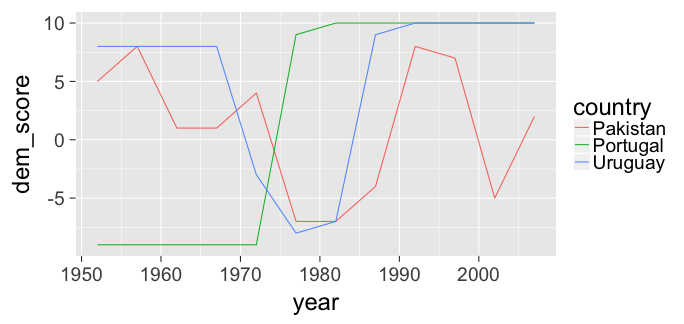<!-- --> --- ## Tidying ### The Life Expectancy by year data ```r library(readr) life_exp_df <- read_csv("data/le_mess.csv") #View(life_exp_df) ``` 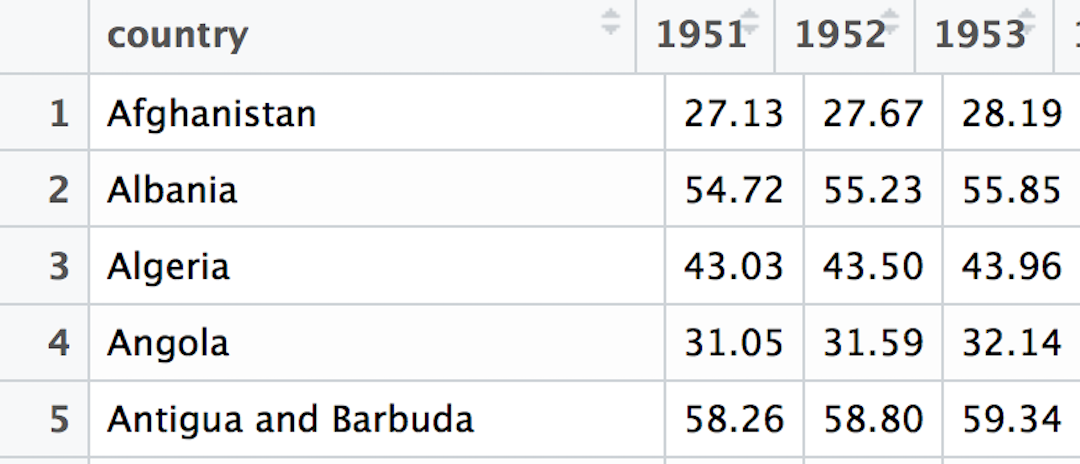<!-- --> --- ## Doing the "tidying"/reshaping ```r library(tidyr) library(dplyr) (life_exp_tidy <- life_exp_df %>% gather(key = "year", value = "life_exp", -country)) ``` ``` # A tibble: 13,332 x 3 country year life_exp <chr> <chr> <dbl> 1 Afghanistan 1951 27.13 2 Albania 1951 54.72 3 Algeria 1951 43.03 4 Angola 1951 31.05 5 Antigua and Barbuda 1951 58.26 6 Argentina 1951 61.93 7 Armenia 1951 62.67 8 Aruba 1951 58.96 9 Australia 1951 68.71 10 Austria 1951 65.24 # ... with 13,322 more rows ``` --- ## Tidying #### World Health Organization TB data (Stata DTA) ```r library(haven) who_df <- read_dta("data/who.dta") #View(who_df) ``` 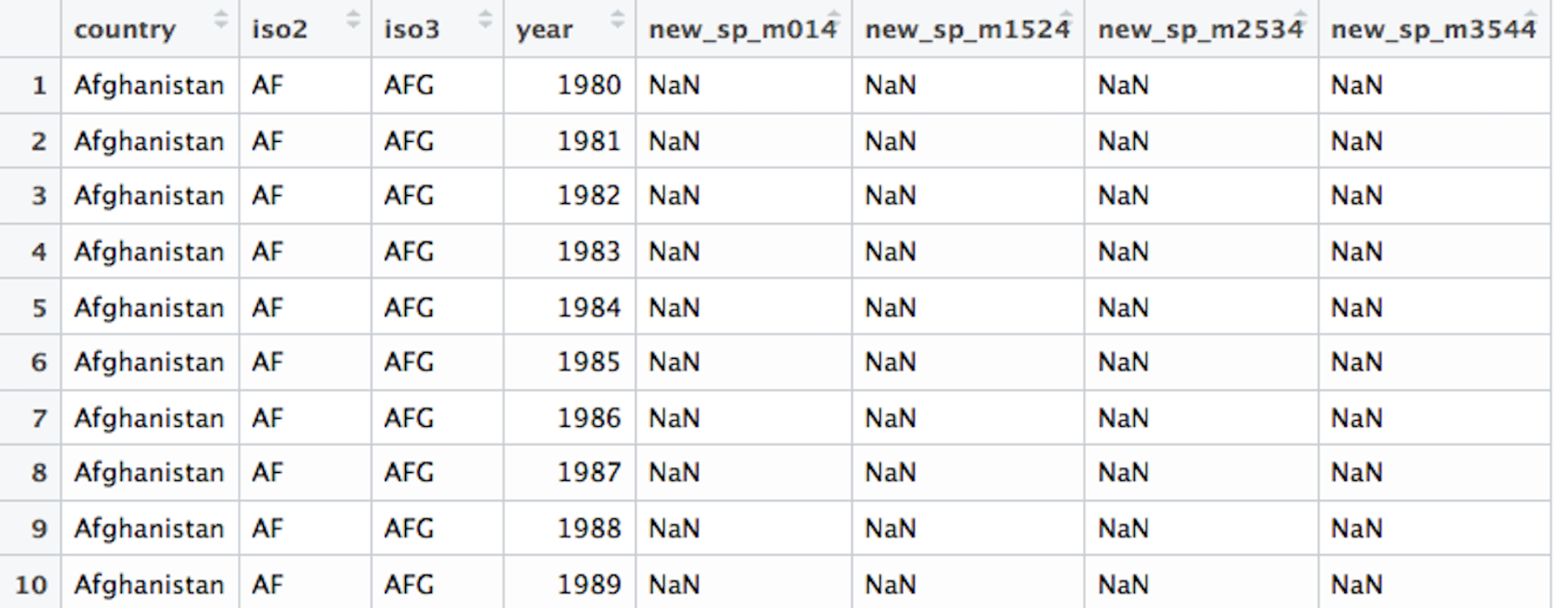<!-- --> --- ## WHO ugly... - This data set contains strange variable names that will require us to look up their meaning in the corresponding [**data dictionary**](https://extranet.who.int/tme/generateCSV.asp?ds=dictionary). -- - What do we know? - `country`, `iso2`, and `iso3` are redundant and identify the country - `year` is a variable and it looks like it corresponds to each country - But what in the world is `new_sp_m014`? And the other columns?... --- ## First step Like before, we can `gather` these non-`country` and non-`year` variables together: ```r who_tidy <- who_df %>% gather(new_sp_m014:newrel_f65, key = "key", value = "value") ``` We can now see what this has done to the data frame: ```r View(who_tidy) ``` --- ## Data dictionary saves us some... 1. The first three letters of entries in the `key` column correspond to `new` or `old` cases of TB. 2. The next two letters (after the `_`) correspond to TB type: - `rel` for relapse, `ep` for extrapulmonary TB - `sn` for smear negative, `sp` for smear positive 3. The next letter after the second `_` corresponds to the sex of the TB patient. 4. The remaining numbers correspond to age group: - `014` for 0 to 14 years - ... - `65` for 65 or older --- - Looking over the entries of `key` in `who_tidy`, do you see anything else that doesn't match the pattern? - It may be easier to remember that the entries of `key` correspond to column names in `who_df`: ```r names(who_df) ``` ``` [1] "country" "iso2" "iso3" "year" [5] "new_sp_m014" "new_sp_m1524" "new_sp_m2534" "new_sp_m3544" [9] "new_sp_m4554" "new_sp_m5564" "new_sp_m65" "new_sp_f014" [13] "new_sp_f1524" "new_sp_f2534" "new_sp_f3544" "new_sp_f4554" [17] "new_sp_f5564" "new_sp_f65" "new_sn_m014" "new_sn_m1524" [21] "new_sn_m2534" "new_sn_m3544" "new_sn_m4554" "new_sn_m5564" [25] "new_sn_m65" "new_sn_f014" "new_sn_f1524" "new_sn_f2534" [29] "new_sn_f3544" "new_sn_f4554" "new_sn_f5564" "new_sn_f65" [33] "new_ep_m014" "new_ep_m1524" "new_ep_m2534" "new_ep_m3544" [37] "new_ep_m4554" "new_ep_m5564" "new_ep_m65" "new_ep_f014" [41] "new_ep_f1524" "new_ep_f2534" "new_ep_f3544" "new_ep_f4554" [45] "new_ep_f5564" "new_ep_f65" "newrel_m014" "newrel_m1524" [49] "newrel_m2534" "newrel_m3544" "newrel_m4554" "newrel_m5564" [53] "newrel_m65" "newrel_f014" "newrel_f1524" "newrel_f2534" [57] "newrel_f3544" "newrel_f4554" "newrel_f5564" "newrel_f65" ``` --- ## A fix using `stringr` You can replace all of the entries in `key` that contained `newrel` with `new_rel` via ```r library(stringr) library(dplyr) who_tidy <- who_tidy %>% mutate(key = str_replace( string = key, pattern = "newrel", replacement = "new_rel") ) ``` --- ## Pulling apart variables The entry `new_sp_m014` is actually four different variables. Use the `separate` function to pull them apart: ```r who_tidy <- who_tidy %>% separate(col = key, into = c("new", "type", "sexage"), sep = "_") who_tidy ``` ``` # A tibble: 405,440 x 8 country iso2 iso3 year new type sexage value * <chr> <chr> <chr> <dbl> <chr> <chr> <chr> <dbl> 1 Afghanistan AF AFG 1980 new sp m014 NaN 2 Afghanistan AF AFG 1981 new sp m014 NaN 3 Afghanistan AF AFG 1982 new sp m014 NaN 4 Afghanistan AF AFG 1983 new sp m014 NaN 5 Afghanistan AF AFG 1984 new sp m014 NaN 6 Afghanistan AF AFG 1985 new sp m014 NaN 7 Afghanistan AF AFG 1986 new sp m014 NaN 8 Afghanistan AF AFG 1987 new sp m014 NaN 9 Afghanistan AF AFG 1988 new sp m014 NaN 10 Afghanistan AF AFG 1989 new sp m014 NaN # ... with 405,430 more rows ``` --- ## One more pull apart - We need to pull `sexage` into two different variables. - If you use `?separate`, you'll see that the following is an option: ```r (who_tidy <- who_tidy %>% separate(col = sexage, into = c("sex", "age"), sep = 1)) ``` ``` # A tibble: 405,440 x 9 country iso2 iso3 year new type sex age value * <chr> <chr> <chr> <dbl> <chr> <chr> <chr> <chr> <dbl> 1 Afghanistan AF AFG 1980 new sp m 014 NaN 2 Afghanistan AF AFG 1981 new sp m 014 NaN 3 Afghanistan AF AFG 1982 new sp m 014 NaN 4 Afghanistan AF AFG 1983 new sp m 014 NaN 5 Afghanistan AF AFG 1984 new sp m 014 NaN 6 Afghanistan AF AFG 1985 new sp m 014 NaN 7 Afghanistan AF AFG 1986 new sp m 014 NaN 8 Afghanistan AF AFG 1987 new sp m 014 NaN 9 Afghanistan AF AFG 1988 new sp m 014 NaN 10 Afghanistan AF AFG 1989 new sp m 014 NaN # ... with 405,430 more rows ``` --- ## Final cleaning - `iso2` and `iso3` are redundant if we have `country` - `new` is constant since this only has new cases of TB - Let's just ignore missing values here - We also know that `value` is actually `cases` so we can `rename` that column. ```r who_tidy <- who_tidy %>% select(-iso2, -iso3, -new) %>% na.omit() %>% rename("cases" = value) head(who_tidy, 5) ``` ``` # A tibble: 5 x 6 country year type sex age cases <chr> <dbl> <chr> <chr> <chr> <dbl> 1 Afghanistan 1997 sp m 014 0 2 Afghanistan 1998 sp m 014 30 3 Afghanistan 1999 sp m 014 8 4 Afghanistan 2000 sp m 014 52 5 Afghanistan 2001 sp m 014 129 ``` --- ## The power of the `%>%` (pipe) Everything we did above can be chained into one sequence: ```r who_tidy <- who_df %>% gather(new_sp_m014:newrel_f65, key = "key", value = "value") %>% mutate(key = str_replace(key, pattern = "newrel", replacement = "new_rel")) %>% separate(col = key, into = c("new", "type", "sexage"), sep = "_") %>% separate(col = sexage, into = c("sex", "age"), sep = 1) %>% select(-iso2, -iso3, -new) %>% na.omit() %>% rename("cases" = value) ``` --- ## BONUS ### A Gapminder tidy dataset read in from a Google Sheet! - I've updated the `gapminder` data set available in the `gapminder` R data package by Jenny Bryan [here](https://github.com/jennybc/gapminder/). Jenny provides [instructions](https://github.com/jennybc/gapminder/tree/master/data-raw) for recreating the data. --- ## BONUS - You can download the updated data from Google Sheets by running the following in R: ```r # Link is https://docs.google.com/spreadsheets/d/18L5ZiXd1CQ97XWSqb04x1YQ4ncsEOdR7eHzgX0ZIuPA/edit?usp=sharing library(googlesheets) updated_gap <- gs_key("18L5ZiXd1CQ97XWSqb04x1YQ4ncsEOdR7eHzgX0ZIuPA") %>% gs_read() ``` - A script going through the steps to take the "messy" original Gapminder.org files and turn them into this tidy dataset is available [here](https://raw.githubusercontent.com/ismayc/tidyverse_workshops/master/importing_tidying/data/cleaning.R). --- ## Practice (after the bootcamp) Try to tidy the other data sets you downloaded and imported or other data sets you have! --- name: model class: inverse, center, middle # Data Modeling --- # Modeling 1. Experience with `ggplot2` package and knowledge of the Grammar of Graphics primes students for modeling 1. Use of the `broom` package to unpack regression output into a tidy format --- ## 1. `ggplot2` Primes Regression Example: * All Alaskan Airlines and Frontier flights leaving NYC in 2013 * We want to study the relationship between temperature and departure delay * For summer (June, July, August) and non-summer months separately Involves four variables: - `carrier`, `temp`, `dep_delay`, `summer` --- ## 1. `ggplot2` Primes Regression ```r flights_subset <- flights %>% filter(carrier == "AS" | carrier == "F9") %>% left_join(weather, by=c("year", "month", "day", "hour", "origin")) %>% filter(dep_delay < 250) %>% mutate(summer = ifelse(month == 6 | month == 7 | month == 8, "Summer Flights", "Non-Summer Flights")) ``` --- ```r ggplot(data = flights_subset, mapping = aes(x = temp, y = dep_delay, color = carrier)) + geom_point() + geom_smooth(method = "lm", se = FALSE) + facet_wrap(~ summer) ``` 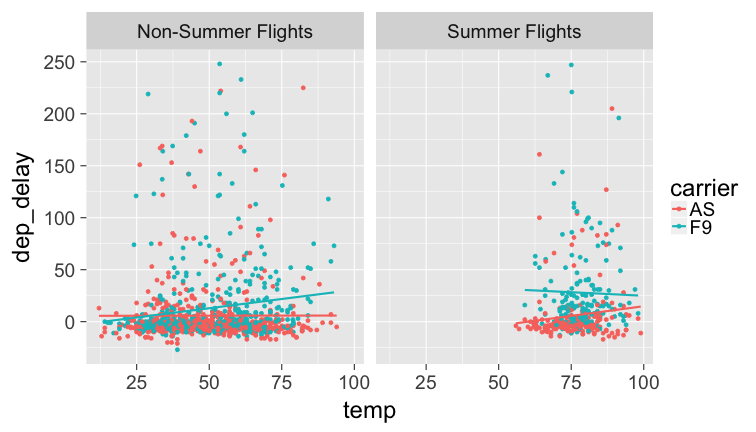<!-- --> --- ## 1. `ggplot2` Primes Regression Why? Dig deeper into data. Look at `origin` and `dest` variables as well: <br> ```r flights_subset %>% group_by(carrier, origin, dest) %>% summarise(`Number of Flights` = n()) ``` ``` Source: local data frame [2 x 4] Groups: carrier, origin [?] # A tibble: 2 x 4 carrier origin dest `Number of Flights` <chr> <chr> <chr> <int> 1 AS EWR SEA 712 2 F9 LGA DEN 675 ``` --- ## 2. `broom` Package * The `broom` package takes the messy output of built-in modeling functions in R, such as `lm`, `nls`, or `t.test`, and turns them into tidy data frames. * Fits in with `tidyverse` ecosystem * This works for [many R data types](https://github.com/tidyverse/broom#available-tidiers)! --- ## 2. `broom` Package In our case, `broom` functions take `lm` objects as inputs and return the following in tidy format! * `tidy()`: regression output table * `augment()`: point-by-point values (fitted values, residuals, predicted values) * `glance()`: scalar summaries like <large> `\(R^2\)` </large>, --- ## 2. `broom` Package Example ```r library(tidyverse) library(nycflights13) library(knitr) library(broom) set.seed(2017) # Load Alaska data, deleting rows that have missing departure delay # or arrival delay data alaska_flights <- flights %>% filter(carrier == "AS") %>% filter(!is.na(dep_delay) & !is.na(arr_delay)) %>% sample_n(50) ``` --- ```r # Exploratory Data Analysis----------------------------------------- # Plot of sample of points: ggplot(data = alaska_flights, mapping = aes(x = dep_delay, y = arr_delay)) + geom_point() ``` <!-- --> --- ```r # Correlation coefficient: alaska_flights %>% summarize(correl = cor(dep_delay, arr_delay)) ``` ``` # A tibble: 1 x 1 correl <dbl> 1 0.7907993 ``` ```r # Add regression line ggplot(data = alaska_flights, mapping = aes(x = dep_delay, y = arr_delay)) + geom_point() + geom_smooth(method = "lm", se = FALSE, color = "red") ``` <!-- --> --- ```r # Fit Regression and Study Output with broom Package------------------- # Fit regression options(scipen = 6) # Set scientific notation delay_fit <- lm(formula = arr_delay ~ dep_delay, data = alaska_flights) # 1. broom::tidy() regression table with confidence intervals # and no p-value stars regression_table <- delay_fit %>% tidy(conf.int = TRUE) regression_table ``` ``` term estimate std.error statistic p.value conf.low 1 (Intercept) -14.155016 2.8094813 -5.038302 7.074778e-06 -19.8038573 2 dep_delay 1.217666 0.1360336 8.951212 8.367030e-12 0.9441519 conf.high 1 -8.506176 2 1.491180 ``` --- ```r # 2. broom::augment() for point-by-point values regression_points <- delay_fit %>% augment() %>% select(arr_delay, dep_delay, .fitted, .resid) regression_points ``` ``` arr_delay dep_delay .fitted .resid 1 -38 -3 -17.808014 -20.1919862 2 86 69 69.863923 16.1360769 3 -38 3 -10.502019 -27.4979809 4 61 53 50.381270 10.6187296 5 3 12 0.456973 2.5430270 6 21 2 -11.719685 32.7196849 7 2 10 -1.978359 3.9783586 8 -41 -9 -25.114009 -15.8859914 9 -19 -7 -22.678677 3.6786770 10 0 -6 -21.461011 21.4610112 11 -6 0 -14.155016 8.1550165 12 -19 -7 -22.678677 3.6786770 13 40 10 -1.978359 41.9783586 14 -9 -6 -21.461011 12.4610112 15 17 28 19.939626 -2.9396257 16 -11 -9 -25.114009 14.1140086 17 -14 1 -12.937351 -1.0626493 18 -37 -10 -26.331674 -10.6683256 19 -21 -4 -19.025680 -1.9743204 20 49 74 75.952252 -26.9522520 21 34 15 4.109970 29.8900296 22 29 7 -5.631356 34.6313559 23 -42 -7 -22.678677 -19.3213230 24 50 54 51.598936 -1.5989362 25 -27 -5 -20.243345 -6.7566546 26 -47 -4 -19.025680 -27.9743204 27 -26 -14 -31.202338 5.2023375 28 -46 -15 -32.420003 -13.5799967 29 -15 -5 -20.243345 5.2433454 30 11 7 -5.631356 16.6313559 31 9 0 -14.155016 23.1550165 32 16 2 -11.719685 27.7196849 33 7 44 39.422278 -32.4222783 34 -36 -5 -20.243345 -15.7566546 35 -34 -2 -16.590348 -17.4096519 36 4 -5 -20.243345 24.2433454 37 -12 -1 -15.372682 3.3726823 38 -26 2 -11.719685 -14.2803151 39 -46 0 -14.155016 -31.8449835 40 -47 -12 -28.767006 -18.2329940 41 -55 -13 -29.984672 -25.0153282 42 -9 -9 -25.114009 16.1140086 43 -23 -1 -15.372682 -7.6273177 44 -19 -16 -33.637669 14.6376691 45 -38 -6 -21.461011 -16.5389888 46 -26 -8 -23.896343 -2.1036572 47 14 2 -11.719685 25.7196849 48 -20 7 -5.631356 -14.3686441 49 -42 -2 -16.590348 -25.4096519 50 -27 -10 -26.331674 -0.6683256 ``` --- ```r # and for prediction new_flights <- data_frame(dep_delay = c(25, 30, 15)) delay_fit %>% augment(newdata = new_flights) ``` ``` dep_delay .fitted .se.fit 1 25 16.28663 3.967287 2 30 22.37496 4.481560 3 15 4.10997 3.134505 ``` --- ```r # 3. broom::glance() scalar summaries of regression regression_summaries <- delay_fit %>% glance() regression_summaries ``` ``` r.squared adj.r.squared sigma statistic p.value df logLik 1 0.6253635 0.6175586 19.48607 80.12419 8.36703e-12 2 -218.4114 AIC BIC deviance df.residual 1 442.8227 448.5588 18225.92 48 ``` --- ```r # Residual Analysis------------------------------------------------------ ggplot(data = regression_points, mapping = aes(x = .resid)) + geom_histogram(binwidth=10, color = "white") + geom_vline(xintercept = 0, color = "blue") ``` <!-- --> --- ```r ggplot(data = regression_points, mapping = aes(x = .fitted, y = .resid)) + geom_point() + geom_abline(intercept = 0, slope = 0, color = "blue") ``` <!-- --> --- ```r ggplot(data = regression_points, mapping = aes(sample = .resid)) + stat_qq() ``` <!-- --> --- class: center, middle, inverse name: rmarkdown # Data Communicating --- ## What is Markdown? - A "plaintext formatting syntax" - Type in plain text, render to more complex formats - One step beyond writing a `txt` file - Render to HTML, PDF, DOCX, etc. using Pandoc --- ## What does it look like? .left-column[ ``` # Header 1 ## Header 2 Normal paragraphs of text go here. **I'm bold** [links!](http://rstudio.com) * Unordered * Lists And Tables ---- ------- Like This ``` ] .right-column[ <img src="figure/markdown.png" alt="markdown" style="width: 270px;"/> ] --- ## What is R Markdown? - "Literate programming" - Embed R code in a Markdown document - Renders textual output along with graphics *** .left-column[ ``` ` ` `{r chunk1} library(ggplot2) library(nycflights13) pdx_flights <- flights %>% filter(dest == "PDX", month == 5) nrow(pdx_flights) ` ` ` ` ` `{r chunk2} ggplot(data = pdx_flights, mapping = aes(x = arr_delay, y = dep_delay)) + geom_point() ` ` ` ``` ] .right-column[ ``` [1] 88 ``` <!-- --> ] --- # Practice Turn a statistical analysis you have conducted into an R Markdown document. - You can also publish online easily to <http://rpubs.com> --- class: middle # Thanks for attending! - Slides created via the R package [xaringan](https://github.com/yihui/xaringan) by Yihui Xie - Source code for these slides and the webpage at <https://github.com/ismayc/poRtland-bootcamp17>